Quartz advanced tutorial

Quartz advanced tutorial.

This is an advanced quartz tutorial which has been tested on JBoss AS 6 which ships withQuartz 1.8.3 release. Here we will show some advanced features of the Quartz scheduler.

Introduction:


If you want to read an introduction to Quartz and JBoss read this tutorial which shows the basics notions and provides some basic samples.

Installing Quartz on JBoss AS 6

The first good news is that if you are using JBoss AS 6 you don’t need to download anything to get working with Quartz.
On earlier releases of the application server (in particular with the 4.x series) it was suggested to remove the Quartz scheduler
from the installation and download a fresh Quartz installation.

# How to store parameters in your Jobs

One common requirement for a Job is to store some properties in it, so that you can customize your Job. The JobDataMap is what you need for it:

01.JobDetail job = new JobDetail("job2""group1", MyJob.class);
02. 
03.JobDataMap map = new JobDataMap();
04. 
05.map.put("param1","some data");
06.map.put("param2",new Long(50));
07.job.setJobDataMap(map);
08.CronTrigger  trigger = new CronTrigger("trigger2""group1""job2""group1",
09."15 0/2 * * * ?");
10.scheduler.addJob(job, true);


Then, in your Job class, you can retrieve the parameters simply with:

01.public class MyJob implements Job{
02.public void execute(JobExecutionContext context) throws JobExecutionException
03.{
04.JobDataMap map = context.getMergedJobDataMap();
05. 
06.String s =  map.getString("param1");
07.long l = map.getLong("param2");
08.}
09.}


Why this is very useful ? as a matter of fact you can use JobDataMap to create dynamically new instances of the same Job which can be parametrized by the content of the JobDataMap.


# How to start/stop the Quartz Scheduler automatically from an Enterprise Application ?

Many developers are not aware that Quartz has many utility classes to manage automatically the start and stop of the Scheduler. You don’t need to re-invent the wheel. The QuartzInitializerServlet does that exactly the job of starting and stopping the Scheduler for you:

Place in your web.xml the following snippet:

01.<servlet>
02.<servlet-name>QuartzInitializer</servlet-name>
03.<servlet-class>org.quartz.ee.servlet.QuartzInitializerServlet</servlet-class>
04.<init-param>
05.<param-name>shutdown-on-unload</param-name>
06.<param-value>true</param-value>
07.</init-param>
08.<init-param>
09.<param-name>start-scheduler-on-load</param-name>
10.<param-value>true</param-value>
11. 
12.</init-param>
13.<load-on-startup>1</load-on-startup>
14.</servlet>


This will automatically start the scheduler (equivalent of scheduler.start()) when the Web application is deployed and shut it down when the application is undeployed.

# How to load the quartz property file from a Web application ?

The simplest way to have your Quartz properties file loaded from a Web application is using again the QuartzInitializerServletand the “config-file” parameter:

01.<servlet>
02.<servlet-name>QuartzInitializer</servlet-name>
03.<servlet-class>org.quartz.ee.servlet.QuartzInitializerServlet</servlet-class>
04.<init-param>
05.<param-name>shutdown-on-unload</param-name>
06.<param-value>true</param-value>
07.</init-param>
08.<init-param>
09. 
10.<param-name>config-file</param-name>
11. 
12.<param-value>quartz.properties</param-value>
13. 
14.</init-param>
15.<load-on-startup>2</load-on-startup>
16.</servlet>


And here’s a sample quartz.properties file that will be loaded:

org.quartz.scheduler.instanceName = QuartzScheduler
org.quartz.scheduler.instanceId = AUTO
org.quartz.threadPool.class = org.quartz.simpl.SimpleThreadPool
org.quartz.threadPool.threadCount = 8
org.quartz.threadPool.threadPriority = 8
org.quartz.jobStore.misfireThreshold = 60000
org.quartz.jobStore.class = org.quartz.simpl.RAMJobStore

Now place the quartz.properties file in the WEB-INF folder of your project and it will be picked up automatically by the QuartzInitializerServlet.

quartz advanced tutorial jboss

Note: if you don’t want to use the QuartzInitializer features you can still set to false the start-scheduler-on-load and shutdown-on-unload properties.


# How do you place a listener on all your Jobs ?

The JobListener interface contains a set of methods that are invoked when certain key events occur in the life cycle of a job. This is can be helpful to keep track of what your Jobs are doing.
By using the addGlobalListener method of the scheduler, you can place a global listener on all jobs:

1.JobDetail job = new JobDetail("job2""group1", MyJob.class);
2. 
3.JobListener jobListener =
4.new MyJobListener();
5.scheduler.addGlobalJobListener(jobListener);
6. 
7.CronTrigger  trigger = new CronTrigger("trigger2""group1""job2""group1","15 0/2 * * * ?");
8.scheduler.addJob(job, true);


And here’s the corresponding interface which needs to implement the JobListener interface:

01.package sample;
02. 
03.import org.quartz.JobExecutionContext;
04. 
05.public class MyJobListener implements JobListener {
06. 
07.public String getName() {
08.return getClass().getSimpleName();
09.}
10. 
11.public void jobExecutionVetoed(JobExecutionContext context) {
12.String jobName = context.getJobDetail().getName();
13.System.out.println(jobName + " is vetoed to be executed");
14. 
15.}
16. 
17.public void jobToBeExecuted(JobExecutionContext context) {
18.String jobName = context.getJobDetail().getName();
19.System.out.println(jobName + " is going to be executed");
20. 
21.}
22. 
23.public void jobWasExecuted(JobExecutionContext context,
24.JobExecutionException exc) {
25.String jobName = context.getJobDetail().getName();
26.System.out.println(jobName + " was executed");
27. 
28.}
29. 
30.}


STICKY NOTE: By using global listeners you can count the amount of jobs which are been executed or are going to be executed. This is quite important if you are going to monitor your Quartz application


# How do you set a listener on a specific Job ?

Sometimes you need a fine grained control over your Jobs, thus you can set a listener JUST on a specific Job. You don’t
need to change too much the earlier code- just use the Scheduler’s addJobListener method instead and register the listener BOTH on the Scheduler and on the Job:

01.JobDetail job = new JobDetail("job2""group1", MyJob.class);
02.CronTrigger  trigger = new CronTrigger("trigger2""group1""job2""group1","15 0/2 * * * ?");
03.JobListener jobListener =
04.new MyJobListener();
05. 
06.scheduler.addJobListener(jobListener);
07. 
08.// Listener set on JobDetail before scheduleJob()
09.jobDetail.addJobListener(jobListener.getName());
10. 
11.// Register the JobDetail and Trigger
12.scheduler.scheduleJob(job, trigger);


#How do you configure Jobs using an XML file ?

If you want to configure your Jobs declaratively, Quartz can do that for you! Here’s how to configure a Cron Job without writing a line of code!
Place at first this file jobs.xml (you can call it as you like it) at the root of your project. (It needs to be moved in the WEB-INF/classes of your Web application)

04.version="1.8">
05. 
06.<schedule>
07.<job>
08.<name>AutomaticJob</name>
09.<group>MYJOB_GROUP</group>
10.<description>The job description</description>
11.<job-class>sample.MyJob</job-class>
12. 
13.</job>
14. 
15.<trigger>
16.<cron>
17.<name>my-trigger</name>
18.<group>MYTRIGGER_GROUP</group>
19.<job-name>AutomaticJob</job-name>
20.<job-group>MYJOB_GROUP</job-group>
21.<cron-expression>15 0/2 * * * ?</cron-expression>
22. 
23.</cron>
24.</trigger>
25.</schedule>
26.</job-scheduling-data>


Here we are firing an AutomaticJob bound the the class sample.MyJob which will fire every 2 minutes. In order to activate this Job we need setting the jobInitializer class which is responsible for firing jobs automatically. Add to your quartz.properties the following properties and that’s all!

org.quartz.plugin.jobInitializer.class = org.quartz.plugins.xml.XMLSchedulingDataProcessorPlugin
org.quartz.plugin.jobInitializer.fileNames =/jobs.xml
org.quartz.plugin.jobInitializer.failOnFileNotFound = true
org.quartz.plugin.jobInitializer.scanInterval = 10
org.quartz.plugin.jobInitializer.wrapInUserTransaction = false


I’ve noticed that the Quartz’s File scan keeps printing the message “Job file not found”. That’s a bit odd, because I’ve tested Jobs are fired correctly!
Java反射机制

Java学习之二-Java反射机制 – Quincy – 博客园.

问题:

在运行时,对一个JAVA类,能否知道属性和方法;能否调用它的任意方法?

答案是可以的,JAVA提供一种反射机制可以实现。

目录

  1. 什么是JAVA的反射机制
  2. JDK中提供的Reflection API
  3. JAVA反射机制提供了什么功能
    • 获取类的Class对象
    • 获取类的Fields
    • 获取类的Method
    • 获取类的Constructor
    • 新建类的实例
             Class<T>的函数newInstance
             通过Constructor对象的方法newInstance
  4. 调用类的函数
             调用private函数
  5. 设置/获取类的属性值
             private属性
  6. 动态创建代理类
             动态代理源码分析
  7. JAVA反射Class<T>类型源代码分析
  8. JAVA反射原理分析
            Class文件结构
            JVM加载类对象,对反射的支持
  9. JAVA反射的应用

一、什么是JAVA的反射机制

Java反射是Java被视为动态(或准动态)语言的一个关键性质。这个机制允许程序在运行时透过Reflection APIs取得任何一个已知名称的class的内部信息,包括其modifiers(诸如public, static 等)、superclass(例如Object)、实现之interfaces(例如Cloneable),也包括fields和methods的所有信息,并可于运行时改变fields内容或唤起methods。

Java反射机制容许程序在运行时加载、探知、使用编译期间完全未知的classes。

换言之,Java可以加载一个运行时才得知名称的class,获得其完整结构。

二、JDK中提供的Reflection API

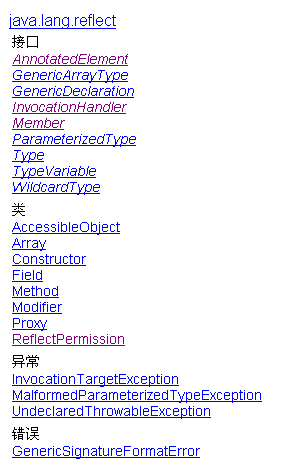
Java反射相关的API在包java.lang.reflect中,JDK 1.6.0的reflect包如下图:

clip_image001

Member接口 该接口可以获取有关类成员(域或者方法)后者构造函数的信息。
AccessibleObject类 该类是域(field)对象、方法(method)对象、构造函数(constructor)对象的基础类。它提供了将反射的对象标记为在使用时取消默认 Java 语言访问控制检查的能力。
Array类 该类提供动态地生成和访问JAVA数组的方法。
Constructor类 提供一个类的构造函数的信息以及访问类的构造函数的接口。
Field类 提供一个类的域的信息以及访问类的域的接口。
Method类 提供一个类的方法的信息以及访问类的方法的接口。
Modifier类 提供了 static 方法和常量,对类和成员访问修饰符进行解码。
Proxy类

提供动态地生成代理类和类实例的静态方法。

三、JAVA反射机制提供了什么功能

Java反射机制提供如下功能:

在运行时判断任意一个对象所属的类

在运行时构造任意一个类的对象

在运行时判段任意一个类所具有的成员变量和方法

在运行时调用任一个对象的方法

在运行时创建新类对象

在使用Java的反射功能时,基本首先都要获取类的Class对象,再通过Class对象获取其他的对象。

这里首先定义用于测试的类:

1
2
3
4
5
6
7
8
9
10
11
12
13
14
15
16
17
18
19
20
21
22
23
24
25
26
27
28
29
30
31
32
33
34
35
36
37
38
39
40
41
42
43
44
45
46
47
48
49
50
51
52
53
54
55
class Type{
    public int pubIntField;
    public String pubStringField;
    private int prvIntField;
    
    public Type(){
        Log("Default Constructor");
    }
    
    Type(int arg1, String arg2){
        pubIntField = arg1;
        pubStringField = arg2;
        
        Log("Constructor with parameters");
    }
    
    public void setIntField(int val) {
        this.prvIntField = val;
    }
    public int getIntField() {
        return prvIntField;
    }
    
    private void Log(String msg){
        System.out.println("Type:" + msg);
    }
}
class ExtendType extends Type{
    public int pubIntExtendField;
    public String pubStringExtendField;
    private int prvIntExtendField;
    
    public ExtendType(){
        Log("Default Constructor");
    }  
    
    ExtendType(int arg1, String arg2){     
        pubIntExtendField = arg1;
        pubStringExtendField = arg2;
        
        Log("Constructor with parameters");
    }
    
    public void setIntExtendField(int field7) {
        this.prvIntExtendField = field7;
    }
    public int getIntExtendField() {
        return prvIntExtendField;
    }
    
    private void Log(String msg){
        System.out.println("ExtendType:" + msg);
    }
}

1、获取类的Class对象

Class 类的实例表示正在运行的 Java 应用程序中的类和接口。获取类的Class对象有多种方式:

调用getClass

Boolean var1 = true;

Class<?> classType2 = var1.getClass();

System.out.println(classType2);

输出:class java.lang.Boolean

运用.class 语法

Class<?> classType4 = Boolean.class;

System.out.println(classType4);

输出:class java.lang.Boolean

运用static method Class.forName()

Class<?> classType5 = Class.forName(“java.lang.Boolean”);

System.out.println(classType5);

输出:class java.lang.Boolean

运用primitive wrapper classes的TYPE 语法

这里返回的是原生类型,和Boolean.class返回的不同

Class<?> classType3 = Boolean.TYPE;

System.out.println(classType3);

输出:boolean

2、获取类的Fields

可以通过反射机制得到某个类的某个属性,然后改变对应于这个类的某个实例的该属性值。JAVA 的Class<T>类提供了几个方法获取类的属性。

public FieldgetField(String name) 返回一个 Field 对象,它反映此 Class 对象所表示的类或接口的指定公共成员字段
public Field[] getFields() 返回一个包含某些 Field 对象的数组,这些对象反映此 Class 对象所表示的类或接口的所有可访问公共字段
public FieldgetDeclaredField(Stringname) 返回一个 Field 对象,该对象反映此 Class 对象所表示的类或接口的指定已声明字段
public Field[] getDeclaredFields()

返回 Field 对象的一个数组,这些对象反映此 Class 对象所表示的类或接口所声明的所有字段

输出:

public int com.quincy.ExtendType.pubIntExtendField

public java.lang.String com.quincy.ExtendType.pubStringExtendField

public int com.quincy.Type.pubIntField

public java.lang.String com.quincy.Type.pubStringField

public int com.quincy.ExtendType.pubIntExtendField

public java.lang.String com.quincy.ExtendType.pubStringExtendField

private int com.quincy.ExtendType.prvIntExtendField

可见getFields和getDeclaredFields区别:

getFields返回的是申明为public的属性,包括父类中定义,

getDeclaredFields返回的是指定类定义的所有定义的属性,不包括父类的。

3、获取类的Method

通过反射机制得到某个类的某个方法,然后调用对应于这个类的某个实例的该方法

Class<T>类提供了几个方法获取类的方法。

public MethodgetMethod(String name,Class<?>… parameterTypes)

返回一个 Method 对象,它反映此 Class 对象所表示的类或接口的指定公共成员方法

public Method[] getMethods()

返回一个包含某些 Method 对象的数组,这些对象反映此 Class 对象所表示的类或接口(包括那些由该类或接口声明的以及从超类和超接口继承的那些的类或接口)的公共 member 方法

public MethodgetDeclaredMethod(Stringname,Class<?>… parameterTypes)

返回一个 Method 对象,该对象反映此 Class 对象所表示的类或接口的指定已声明方法

public Method[] getDeclaredMethods()

返回 Method 对象的一个数组,这些对象反映此 Class 对象表示的类或接口声明的所有方法,包括公共、保护、默认(包)访问和私有方法,但不包括继承的方法

输出:

public void com.quincy.ExtendType.setIntExtendField(int)

public int com.quincy.ExtendType.getIntExtendField()

public void com.quincy.Type.setIntField(int)

public int com.quincy.Type.getIntField()

public final native void java.lang.Object.wait(long) throws java.lang.InterruptedException

public final void java.lang.Object.wait() throws java.lang.InterruptedException

public final void java.lang.Object.wait(long,int) throws java.lang.InterruptedException

public boolean java.lang.Object.equals(java.lang.Object)

public java.lang.String java.lang.Object.toString()

public native int java.lang.Object.hashCode()

public final native java.lang.Class java.lang.Object.getClass()

public final native void java.lang.Object.notify()

public final native void java.lang.Object.notifyAll()

private void com.quincy.ExtendType.Log(java.lang.String)

public void com.quincy.ExtendType.setIntExtendField(int)

public int com.quincy.ExtendType.getIntExtendField()

4、获取类的Constructor

通过反射机制得到某个类的构造器,然后调用该构造器创建该类的一个实例

Class<T>类提供了几个方法获取类的构造器。

public Constructor<T> getConstructor(Class<?>… parameterTypes)

返回一个 Constructor 对象,它反映此 Class 对象所表示的类的指定公共构造方法

public Constructor<?>[] getConstructors()

返回一个包含某些 Constructor 对象的数组,这些对象反映此 Class 对象所表示的类的所有公共构造方法

public Constructor<T> getDeclaredConstructor(Class<?>… parameterTypes)

返回一个 Constructor 对象,该对象反映此 Class 对象所表示的类或接口的指定构造方法

public Constructor<?>[] getDeclaredConstructors()

返回 Constructor 对象的一个数组,这些对象反映此 Class 对象表示的类声明的所有构造方法。它们是公共、保护、默认(包)访问和私有构造方法

5、新建类的实例

通过反射机制创建新类的实例,有几种方法可以创建

调用无自变量ctor

1、调用类的Class对象的newInstance方法,该方法会调用对象的默认构造器,如果没有默认构造器,会调用失败.

Class<?> classType = ExtendType.class;

Object inst = classType.newInstance();

System.out.println(inst);

输出:

Type:Default Constructor

ExtendType:Default Constructor

com.quincy.ExtendType@d80be3

2、调用默认Constructor对象的newInstance方法

Class<?> classType = ExtendType.class;

Constructor<?> constructor1 = classType.getConstructor();

Object inst = constructor1.newInstance();

System.out.println(inst);

输出:

Type:Default Constructor

ExtendType:Default Constructor

com.quincy.ExtendType@1006d75

调用带参数ctor

3、调用带参数Constructor对象的newInstance方法

Constructor<?> constructor2 =

classType.getDeclaredConstructor(int.class, String.class);

Object inst = constructor2.newInstance(1, “123”);

System.out.println(inst);

输出:

Type:Default Constructor

ExtendType:Constructor with parameters

com.quincy.ExtendType@15e83f9

6、调用类的函数

通过反射获取类Method对象,调用Field的Invoke方法调用函数。

7、设置/获取类的属性值

通过反射获取类的Field对象,调用Field方法设置或获取值

四、动态创建代理类

代理模式:代理模式的作用=为其他对象提供一种代理以控制对这个对象的访问。

代理模式的角色:

抽象角色:声明真实对象和代理对象的共同接口

代理角色:代理角色内部包含有真实对象的引用,从而可以操作真实对象。

真实角色:代理角色所代表的真实对象,是我们最终要引用的对象。

动态代理:

java.lang.reflect.Proxy

Proxy 提供用于创建动态代理类和实例的静态方法,它还是由这些方法创建的所有动态代理类的超类

InvocationHandler

是代理实例的调用处理程序 实现的接口,每个代理实例都具有一个关联的调用处理程序。对代理实例调用方法时,将对方法调用进行编码并将其指派到它的调用处理程序的 invoke 方法。

动态Proxy是这样的一种类:

它是在运行生成的类,在生成时你必须提供一组Interface给它,然后该class就宣称它实现了这些interface。你可以把该class的实例当作这些interface中的任何一个来用。当然,这个Dynamic Proxy其实就是一个Proxy,它不会替你作实质性的工作,在生成它的实例时你必须提供一个handler,由它接管实际的工作。

在使用动态代理类时,我们必须实现InvocationHandler接口

步骤:

1、定义抽象角色

public interface Subject {

public void Request();

}

2、定义真实角色

public class RealSubject implements Subject {

@Override

public void Request() {

// TODO Auto-generated method stub

System.out.println(“RealSubject”);

}

}

3、定义代理角色

public class DynamicSubject implements InvocationHandler {

private Object sub;

public DynamicSubject(Object obj){

this.sub = obj;

}

@Override

public Object invoke(Object proxy, Method method, Object[] args)

throws Throwable {

// TODO Auto-generated method stub

System.out.println(“Method:”+ method + “,Args:” + args);

method.invoke(sub, args);

return null;

}

}

4、通过Proxy.newProxyInstance构建代理对象

RealSubject realSub = new RealSubject();

InvocationHandler handler = new DynamicSubject(realSub);

Class<?> classType = handler.getClass();

Subject sub = (Subject)Proxy.newProxyInstance(classType.getClassLoader(),

realSub.getClass().getInterfaces(), handler);

System.out.println(sub.getClass());

5、通过调用代理对象的方法去调用真实角色的方法。

sub.Request();

输出:

class $Proxy0 新建的代理对象,它实现指定的接口

Method:public abstract void DynamicProxy.Subject.Request(),Args:null

RealSubject 调用的真实对象的方法